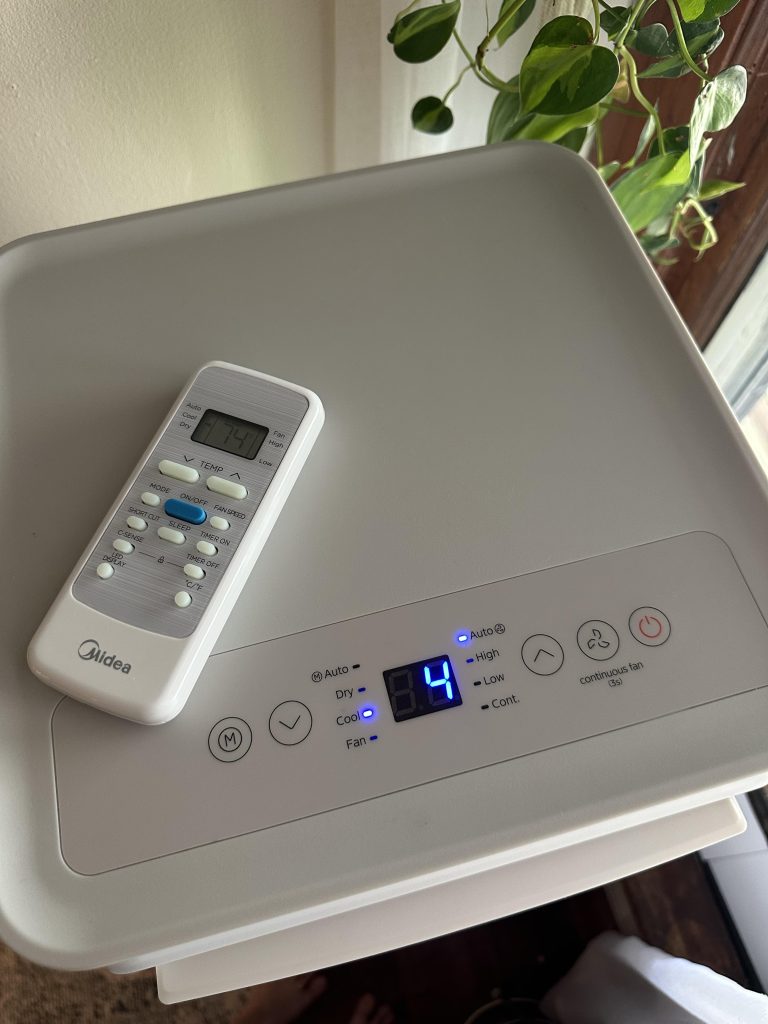
Are you confused about whether your air conditioner fan should be set to “Auto” or “On”? You’re not alone.
This small switch can make a big difference in your comfort, energy bills, and even the air quality in your home. Choosing the right setting can help you stay cool while saving money and keeping your system running smoothly. Keep reading to discover which option works best for you and why it matters more than you might think.

Credit: m.youtube.com
Fan Settings Explained
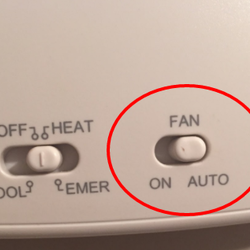
Choosing between auto or on for your air conditioner fan affects energy use and comfort. Auto mode runs the fan only when cooling, saving power. On mode keeps air moving but uses more energy.
Auto Mode Basics
Auto moderuns the fan only when the air conditioner cools the air. This saves energyand keeps the room comfortable. The fan stops when the desired temperature is reached. It helps reduce noiseand wearon the fan. Auto mode is quietand efficient.
On Mode Basics
On modekeeps the fan running all the time. This moves air constantlyand can help with better air circulation. The air might feel cooler but it uses more energy. The fan noise stays constant. On mode can help if you want even air flowor if your AC cools slowly.
Energy Efficiency Comparison
Power consumptionvaries between auto mode and on mode in air conditioners. In auto mode, the fan speed adjusts based on room temperature. This adjustment helps save energy by running the fan only as fast as needed. The air conditioner uses less electricity because the fan is not always running at full speed.
In contrast, the on modekeeps the fan running constantly at the set speed. This can use more power because the fan does not slow down, even when cooling is not needed. The continuous operation may lead to higher electricity bills.
| Mode | Fan Operation | Power Usage |
|---|---|---|
| Auto Mode | Fan speed adjusts automatically | Lower power consumption |
| On Mode | Fan runs continuously at set speed | Higher power consumption |
Cooling Performance Differences
Auto fanadjusts speed based on room temperature. It runs only when cooling is needed. This saves energy and keeps the room comfortable. The air moves softly and evenly. It helps maintain a steady temperature without sudden blasts of cold air.
On fanruns constantly at one speed. It moves air all the time, even if the AC is not cooling. This can feel like a breeze but uses more energy. The air may feel cooler near the vents but warmer farther away. It can cause uneven cooling in the room.

Credit: www.reddit.com
Impact On Air Quality
Auto modeadjusts the fan speed based on room temperature. This helps the filter work efficientlyby running at needed speeds. It keeps air cleaner by trapping more dust and pollen. The fan runs only when needed, saving energy and reducing wear on the filter.
In on mode, the fan runs continuously. This means air passes through the filter all the time. It can catch more particles, but the filter may clog faster. Constant fan use may increase energy use and need more filter cleaning or replacement.
| Feature | Auto Mode | On Mode |
|---|---|---|
| Fan Operation | Runs as needed | Runs continuously |
| Filter Efficiency | Works efficiently without overuse | High particle capture but faster clogging |
| Energy Use | Lower energy consumption | Higher energy consumption |
| Maintenance | Less frequent filter cleaning | More frequent filter cleaning |
Noise Levels And Comfort
Choosing the fan setting affects noise and comfort. Auto mode runs the fan only when needed, keeping noise low. On mode keeps the fan running constantly, which can be louder but may cool more evenly.
Noise Produced By Auto Setting
The auto fan settingadjusts speed based on room temperature. This means the fan runs only when needed. It usually makes less noisebecause it doesn’t run constantly. The sound is softer and less distracting. This setting helps keep the room quiet and comfortable. It also saves energy since the fan turns off sometimes.
Noise Produced By On Setting
The on fan settingruns the fan all the time. This constant running creates more noise. Some people find it bothersome, especially at night. But it helps circulate air betterand keeps temperature steady. The noise level is higher but the room feels more evenly cooled.
Wear And Tear On The System
Fan motor longevitydepends on how often it runs. In Auto mode, the fan runs only when cooling is needed. This means less wear and tear on the motor. It also saves energy and reduces noise. The motor gets breaks, which helps it last longer.
In On mode, the fan runs all the time, even when cooling is off. This causes more wear on the fan motorbecause it keeps spinning. The motor may wear out faster and need repairs sooner. It also uses more electricity.
| Mode | Fan Operation | Effect on Motor | Energy Use |
|---|---|---|---|
| Auto | Runs only when cooling | Less wear, longer motor life | Lower |
| On | Runs constantly | More wear, shorter motor life | Higher |
Best Practices For Different Seasons
Summer fan settinghelps to cool the room faster. The fan on auto moderuns only when the AC compressor is on. This saves energy and keeps the air fresh. The fan on on moderuns all the time, even when the compressor is off. This can increase electricity bills and may not cool as well.
In winter, using the fan on autohelps to circulate warm air only when the heater runs. The fan on onmode keeps blowing air constantly, which can waste energy and dry out the room.
| Season | Fan Setting | Benefit |
|---|---|---|
| Summer | Auto | Saves energy, cools efficiently |
| Summer | On | Constant airflow, higher energy use |
| Winter | Auto | Circulates warm air only when needed |
| Winter | On | Constant airflow, wastes energy |
Credit: www.aiellohomeservices.com
When To Choose Auto Over On
The auto fan settingruns the fan only when the air conditioner cools. This saves energy and lowers electricity bills. The fan stops when the desired temperature is reached, giving you a quieter room.
Choose autoif you want:
- Energy savings
- Less noise
- Better humidity control
- Consistent room temperature
The on settingkeeps the fan running all the time. This helps with air circulation but uses more power. It can also spread dust and allergens if filters are dirty.
When To Choose On Over Auto
Choosing “On”keeps the fan running all the time. This helps circulate aireven when the AC is not cooling. It can make the room feel fresher. Good for filtering dustand allergens continuously.
Use “On” if you want:
- Constant air movement for better air quality
- The fan to help spread heat or cool air evenly
- To avoid sudden changes in air flow noise
But it uses more electricitythan Auto. So, it may increase energy bills. The fan runs even when not needed for cooling.
Tips To Maximize Ac Efficiency
Selecting the right fan setting on your AC can boost its efficiency. The ‘auto’ setting adjusts the fan speed according to your cooling needs, conserving energy. Leaving the fan ‘on’ constantly circulates air, but may increase energy use.
- Set the fan to Autoto save energy and reduce wear.
- Auto mode runs the fan only when the AC cools the air.
- Running the fan constantly wastes electricity and cools less efficiently.
- Keep air filters clean for better airflow and less energy use.
- Close windows and doors to keep cool air inside.
- Use ceiling fans to help spread cool air evenly.
- Set thermostat to a comfortable but not too low temperature.
- Regular maintenance keeps the AC running smoothly and saves money.
Frequently Asked Questions
What Does Ac Fan Auto Setting Do?
The auto setting allows the fan to run only when the AC is actively cooling or heating. This setting adjusts fan speed based on your home’s temperature needs, enhancing energy efficiency. It helps maintain a consistent temperature and reduces energy costs by avoiding continuous fan operation.
Is Leaving The Ac Fan On Bad?
Leaving the AC fan on continuously can increase energy costs and wear out the system faster. While it helps circulate air, it’s less energy-efficient compared to the auto setting. The fan-on setting might also cause uneven temperature distribution, leading to discomfort in some areas of your home.
Does Auto Mode Save Energy?
Yes, using the auto mode can save energy. It ensures the fan operates only when necessary, reducing unnecessary energy consumption. This setting optimizes system performance and maintains consistent indoor temperatures. By reducing continuous fan operation, you can lower electricity bills and extend the lifespan of your AC system.
Why Choose Auto Over On Setting?
Choosing auto over the on setting helps improve energy efficiency and system longevity. Auto mode adjusts fan speed based on cooling or heating needs, reducing energy use. It ensures better temperature control and minimizes wear on the AC system, offering a cost-effective and comfortable home environment.
Conclusion
Choosing between auto and on fan settings depends on your needs. Auto saves energy by running the fan only when cooling. On keeps air moving constantly, which can help with air circulation. For better efficiency and comfort, auto is usually best.
Still, some may prefer the steady breeze from on. Think about your room, climate, and comfort before deciding. Small changes can make your air conditioner work smarter. Experiment a bit to find what feels right for you.