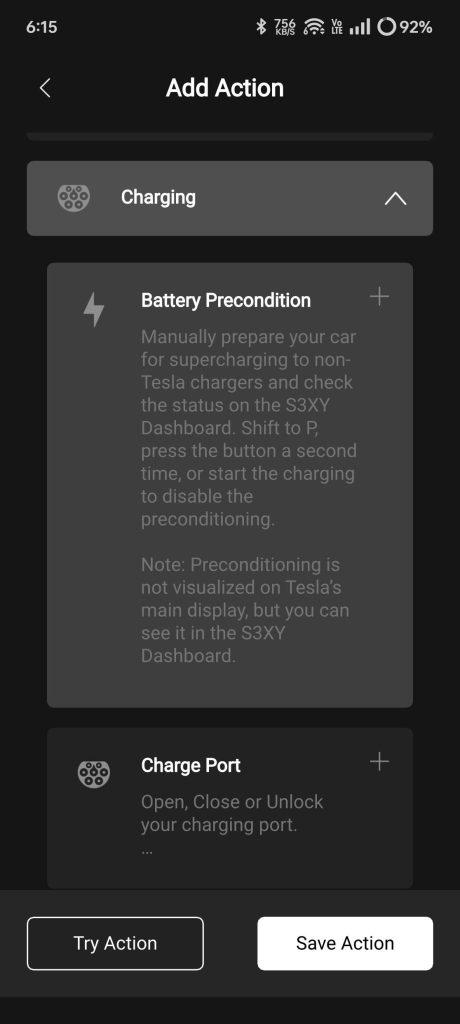
If you own a Tesla, you want every charge to be as fast and efficient as possible. Did you know that preconditioning your Tesla’s battery before supercharging can save you precious minutes and protect your battery’s health?
Understanding how to properly prepare your battery can make a big difference in your charging experience. You’ll discover simple, effective steps to precondition your Tesla battery for supercharging. Keep reading to unlock the secrets that will help you charge smarter and drive farther.

Credit: www.reddit.com
Why Battery Preconditioning Matters
Battery preconditioning is essential for Tesla owners who want a faster and safer charging experience. It warms the battery to the right temperature before using a Supercharger. Cold batteries charge slower and can suffer damage over time. Preconditioning helps avoid these issues by preparing the battery for optimal performance.
Impact On Charging Speed
Preconditioning makes the battery warm enough to accept high power. Cold batteries reduce charging speed significantly. Tesla’s system automatically heats the battery during navigation to a Supercharger. This process can cut charging time by up to 30%. Faster charging means less waiting and more driving time.
Battery Health Benefits
Charging a cold battery at high power causes stress and wear. Preconditioning protects the battery cells by reducing this stress. It extends the battery’s lifespan and maintains its capacity longer. Well-maintained batteries keep Tesla’s range and efficiency stable. Preconditioning is a simple step to protect your investment.
Credit: www.teslaownersonline.com
When Does Preconditioning Activate
Understanding when Tesla’s battery preconditioning activates can save you time and improve your charging experience. Preconditioning warms up the battery to the ideal temperature for fast Supercharging, ensuring efficiency and battery health. But how does your Tesla know when to start this process?
Automatic Triggers
Tesla’s system automatically starts preconditioning based on several factors. When you set a Supercharger as your destination in the navigation system, the car calculates the best time to warm the battery. This timing depends on your current battery temperature and the distance to the charger.
Cold weather plays a significant role here. If the outside temperature is low, the system begins preconditioning earlier to avoid slow charging speeds. The vehicle monitors battery temperature continuously and adjusts preconditioning dynamically, so you rarely need to worry about it.
Have you noticed your Tesla starting to warm up just before you arrive at a Supercharger? That’s the automatic system working to optimize your charging session without any input from you.
Manual Activation Options
Sometimes, you may want to take control and manually activate battery preconditioning. Tesla’s mobile app allows you to start preconditioning remotely. This is especially useful if you know you’ll be charging soon and want to ensure your battery is ready.
You can also trigger preconditioning by setting a Supercharger as your destination in the car’s navigation system. Even if you don’t start driving immediately, the system will begin warming the battery to prepare for fast charging.
Would you rather have the car do the thinking or prefer to manage preconditioning yourself? The manual options give you flexibility depending on your driving habits and schedule.
Steps To Precondition Tesla Battery
Preconditioning your Tesla battery before using a Supercharger helps improve charging speed and battery health. Preparing the battery optimizes temperature for fast, efficient charging. Follow these simple steps to precondition your Tesla battery effectively.
Setting Destination To Supercharger
Enter the Supercharger location in your Tesla’s navigation system. The car automatically starts warming the battery on the route. This ensures the battery reaches the right temperature before charging.
Monitoring Battery Temperature
Keep an eye on the battery temperature via the Tesla app or dashboard. The ideal range is usually between 20°C and 40°C (68°F to 104°F). If the battery is too cold or hot, the charging speed slows down.
Adjusting Driving Habits
Drive smoothly and avoid rapid acceleration before reaching the Supercharger. Moderate driving helps the battery warm evenly. Avoid stopping for long periods before charging to maintain battery temperature.
Tools And Features Supporting Preconditioning
Preconditioning your Tesla battery before supercharging is key to getting the most efficient and fastest charge. Tesla has built smart tools and features that help you prepare the battery without extra hassle. These technologies work together to heat the battery to the ideal temperature, making your charging stops quicker and smoother.
Tesla Navigation System
Your Tesla’s navigation system does more than just guide you to your destination. When you set a supercharger as your destination, it automatically starts preconditioning the battery along the way. This means your battery warms up progressively, so by the time you arrive, it’s ready for optimal charging speed.
Have you noticed how your trip planning changes when you use the navigation system? It not only maps the route but also improves your charging experience without extra effort from you. This feature saves you time and reduces battery wear, which is a win-win for every Tesla driver.
Mobile App Notifications
The Tesla mobile app keeps you in the loop with real-time updates about your car’s charging status and battery health. It can notify you when preconditioning starts and when the battery reaches the right temperature for supercharging. This way, you can plan your breaks or tasks without worrying about the charging process.
Imagine getting a heads-up on your phone that your battery is ready just as you arrive at a supercharger. It helps you avoid unnecessary waiting and makes your charging stops more predictable. Have you tried relying on these notifications during a long trip? They’re a handy tool to manage your time better.
Common Mistakes To Avoid
Preconditioning your Tesla battery before supercharging helps reduce charging time and protects battery health. Avoiding common mistakes ensures better performance and longer battery life. Many Tesla owners skip or delay important steps that harm efficiency. Recognizing these errors can save time and frustration during your charging stops.
Ignoring Battery Temperature
Battery temperature affects charging speed and safety. Cold batteries charge slower and might not accept full power. Hot batteries risk damage if charged too fast. Tesla uses battery preconditioning to warm or cool the battery. Skipping this step leads to slower charging and more wear on the battery.
Delaying Supercharger Arrival
Starting battery preconditioning too late reduces its benefit. Tesla begins warming or cooling the battery when navigation directs to a Supercharger. Arriving without enough time means the battery is not ready for fast charging. This causes longer charging stops and less efficient energy use.

Credit: www.youtube.com
Tips To Maximize Supercharging Speed
Maximizing the speed of Tesla supercharging helps save time and improves your driving experience. Preparing your battery correctly allows it to accept charge faster and more efficiently. Knowing the best practices to precondition the battery ensures quicker stops and smoother trips.
Optimal State Of Charge
Starting supercharging with a battery charge between 10% and 50% is best. A battery too low or too full charges slower. Keeping the battery in this range reduces the time needed to reach 80%.
Charging above 80% slows down because the battery limits speed to protect itself. Aim to stop charging before 90% unless needed for longer trips. This saves time and extends battery life.
Ideal Time To Charge
Preconditioning the battery before supercharging is crucial. Tesla cars heat or cool the battery to the right temperature for fast charging. This happens automatically if you set a navigation route to a Supercharger.
Starting supercharging soon after arriving helps keep the battery temperature optimal. Avoid waiting too long before plugging in. The battery cools down and charging slows.
Charging during moderate outside temperatures also helps. Extreme cold or heat can reduce charging speed. If possible, plan supercharging during mild weather for better results.
Frequently Asked Questions
What Is Tesla Battery Preconditioning?
Tesla battery preconditioning optimizes the battery temperature for efficient supercharging. This process ensures the battery operates at the ideal temperature. Preconditioning reduces charging time and enhances battery health, resulting in improved performance. Tesla vehicles automatically precondition the battery when a Supercharger is set as a destination in the navigation system.
How To Enable Tesla Preconditioning?
Tesla preconditioning is automatically activated when you set a Supercharger as your destination. The vehicle’s navigation system will precondition the battery during your drive. This ensures optimal temperature for fast charging. You don’t need to manually enable it, as Tesla handles this process to improve charging efficiency.
Why Is Preconditioning Important For Supercharging?
Preconditioning is crucial for efficient supercharging because it optimizes battery temperature. This process reduces charging time and preserves battery health. By preconditioning, Tesla ensures that the battery is ready to accept higher charge rates. This results in faster charging sessions and enhanced overall battery performance.
Does Preconditioning Affect Tesla Battery Life?
Preconditioning positively impacts Tesla battery life by optimizing temperature during charging. This process reduces stress on the battery cells, enhancing longevity. By maintaining optimal temperatures, preconditioning prevents excessive heat build-up. This helps in prolonging battery health, ensuring efficient performance over the vehicle’s lifespan.
Conclusion
Preconditioning your Tesla battery helps charge faster and safer. It warms the battery to the right temperature before supercharging. This process can save you time on long trips. Always plan ahead to activate preconditioning early. Keeping the battery healthy improves overall car performance.
Small steps like these make a big difference. Try these tips to get the most from your Tesla’s supercharging. Simple and smart habits keep your driving smooth and easy.